[EN] OSPF Route Filtering
Hi everyone, in this article I will walk you through how to configure OSPF Route Filtering through a lab in the exhibit.
By default, there is no configuration for route filtering, so routers accept all advertisements and write them into their routing table.
But what if we do not want to see any specific route in our routing table?
This is where Route Filtering comes in. Route filtering is used to prevent unwanted routes from being written into the routing table.
Important Note: In OSPF, distribute-list in filters routes from being installed in the routing table (RIB), but it does not prevent the router from receiving Link State Advertisements (LSAs) or maintaining them in the Link State Database (LSDB). The router still processes OSPF updates normally; it simply filters which routes get installed in the routing table. This is different from distance-vector protocols where distribute-list can prevent route advertisements entirely.
I will demonstrate this configuration using the following preconfigured lab topology.
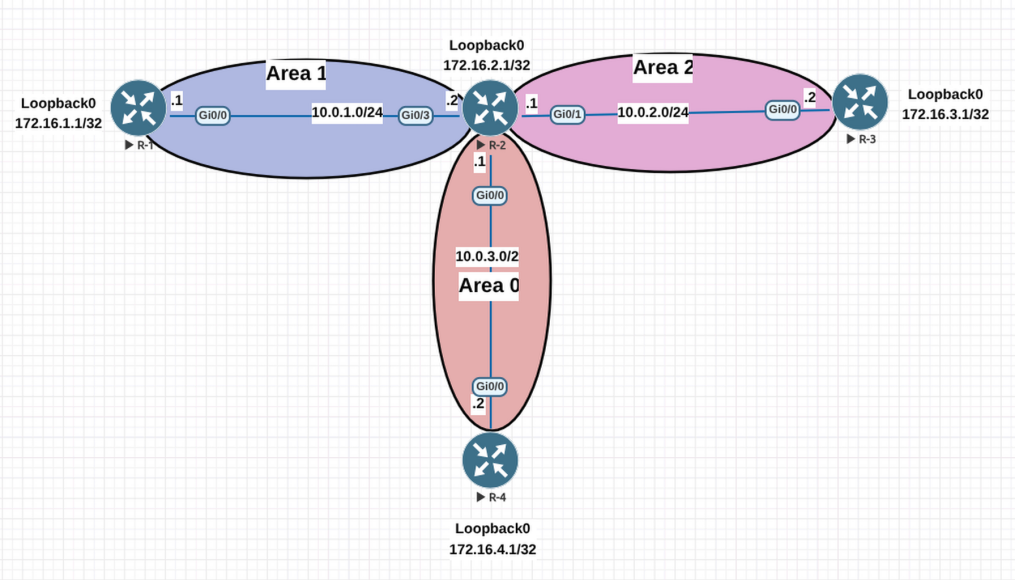
R1 Routing Table:
R-1(config-if)#do sh ip ro
Codes: L - local, C - connected, S - static, R - RIP, M - mobile, B - BGP
      D - EIGRP, EX - EIGRP external, O - OSPF, IA - OSPF inter area
      N1 - OSPF NSSA external type 1, N2 - OSPF NSSA external type 2
      E1 - OSPF external type 1, E2 - OSPF external type 2
      i - IS-IS, su - IS-IS summary, L1 - IS-IS level-1, L2 - IS-IS level-2
      ia - IS-IS inter area, * - candidate default, U - per-user static route
      o - ODR, P - periodic downloaded static route, H - NHRP, l - LISP
      a - application route
      + - replicated route, % - next hop override, p - overrides from PfR

Gateway of last resort is not set

     10.0.0.0/8 is variably subnetted, 4 subnets, 2 masks
C        10.0.1.0/24 is directly connected, GigabitEthernet0/0
L        10.0.1.1/32 is directly connected, GigabitEthernet0/0
O IA     10.0.2.0/24 [110/200] via 10.0.1.2, 00:12:15, GigabitEthernet0/0
O IA     10.0.3.0/24 [110/200] via 10.0.1.2, 00:12:34, GigabitEthernet0/0
     172.16.0.0/32 is subnetted, 4 subnets
C        172.16.1.1 is directly connected, Loopback0
O        172.16.2.1 [110/101] via 10.0.1.2, 00:01:13, GigabitEthernet0/0
O IA     172.16.3.1 [110/201] via 10.0.1.2, 00:10:40, GigabitEthernet0/0
O IA     172.16.4.1 [110/201] via 10.0.1.2, 00:08:47, GigabitEthernet0/0
As you can see in R-1’s routing table above, R-1 has learned other networks from 10.0.1.2. However, I want to filter the 10.0.2.0/24 subnet, so I don’t want this route to be installed in R-1’s routing table. Let’s configure it.
The configuration uses a prefix-list to deny the specific route and permit all others. The distribute-list command applies this filter to routes being installed in the routing table from OSPF:
- seq 10 deny 10.0.2.0/24: Denies the specific 10.0.2.0/24 route
- seq 15 permit 0.0.0.0/0 le 32: Permits all other routes (0.0.0.0/0 with length less than or equal to 32 means all possible routes)
R-1(config)#ip prefix-list NO_10.0.2.0/24 seq 10 deny 10.0.2.0/24
R-1(config)#ip prefix-list NO_10.0.2.0/24 seq 15 permit 0.0.0.0/0 le 32
R-1(config)#router ospf 1
R-1(config-router)#distribute-list prefix NO_10.0.2.0/24 in
R-1 Routing Table:
R-1(config-router)#do sh ip ro
Codes: L - local, C - connected, S - static, R - RIP, M - mobile, B - BGP
      D - EIGRP, EX - EIGRP external, O - OSPF, IA - OSPF inter area
      N1 - OSPF NSSA external type 1, N2 - OSPF NSSA external type 2
      E1 - OSPF external type 1, E2 - OSPF external type 2
      i - IS-IS, su - IS-IS summary, L1 - IS-IS level-1, L2 - IS-IS level-2
      ia - IS-IS inter area, * - candidate default, U - per-user static route
      o - ODR, P - periodic downloaded static route, H - NHRP, l - LISP
      a - application route
      + - replicated route, % - next hop override, p - overrides from PfR

Gateway of last resort is not set

     10.0.0.0/8 is variably subnetted, 3 subnets, 2 masks
C        10.0.1.0/24 is directly connected, GigabitEthernet0/0
L        10.0.1.1/32 is directly connected, GigabitEthernet0/0
O IA     10.0.3.0/24 [110/200] via 10.0.1.2, 00:00:48, GigabitEthernet0/0
     172.16.0.0/32 is subnetted, 4 subnets
C        172.16.1.1 is directly connected, Loopback0
O        172.16.2.1 [110/101] via 10.0.1.2, 00:00:48, GigabitEthernet0/0
O IA     172.16.3.1 [110/201] via 10.0.1.2, 00:00:48, GigabitEthernet0/0
O IA     172.16.4.1 [110/201] via 10.0.1.2, 00:00:48, GigabitEthernet0/0
R-1 OSPF Database:
R-1#sh ip ospf database

           OSPF Router with ID (1.1.1.1) (Process ID 1)

               Router Link States (Area 1)

Link ID         ADV Router      Age         Seq#       Checksum Link count
1.1.1.1         1.1.1.1         209         0x80000006 0x0023B6 2
2.2.2.2         2.2.2.2         1485        0x80000006 0x00FCD1 2

               Net Link States (Area 1)

Link ID         ADV Router      Age         Seq#       Checksum
10.0.1.2        2.2.2.2         345         0x80000002 0x0036E1

               Summary Net Link States (Area 1)

Link ID         ADV Router      Age         Seq#       Checksum
10.0.2.0        2.2.2.2         101         0x80000002 0x009E25
10.0.3.0        2.2.2.2         345         0x80000002 0x00932F
172.16.3.1      2.2.2.2         101         0x80000002 0x00907D
172.16.4.1      2.2.2.2         101         0x80000002 0x008587
Notice that even though 10.0.2.0/24 has been filtered from R-1’s routing table, you can still see it in the OSPF database under “Summary Net Link States” (line 105). This demonstrates the key point mentioned earlier: distribute-list in filters routes from the routing table, but the router still maintains the LSA in its Link State Database. The router continues to receive and process OSPF updates normally; it simply prevents the filtered route from being installed in the routing table.
Ping:
R-1(config-router)#do ping 10.0.2.2
Type escape sequence to abort.
Sending 5, 100-byte ICMP Echos to 10.0.2.2, timeout is 2 seconds:
.....
Success rate is 0 percent (0/5)


R-1(config-router)#do ping 172.16.3.1
Type escape sequence to abort.
Sending 5, 100-byte ICMP Echos to 172.16.3.1, timeout is 2 seconds:
!!!!!
Success rate is 100 percent (5/5), round-trip min/avg/max = 4/5/8 ms
As you can see in the routing table, there is no route related to the 10.0.2.0/24 subnet. Unlike pinging 10.0.2.2, I can successfully ping the IP address of R-3’s loopback, which is 172.16.3.1.
Now let’s configure R-4 to prevent routes for the 10.0.1.0/24 subnet from being added to its routing table.
R-4 Routing Table:
R-4(config)#do sh ip route
Codes: L - local, C - connected, S - static, R - RIP, M - mobile, B - BGP
      D - EIGRP, EX - EIGRP external, O - OSPF, IA - OSPF inter area
      N1 - OSPF NSSA external type 1, N2 - OSPF NSSA external type 2
      E1 - OSPF external type 1, E2 - OSPF external type 2
      i - IS-IS, su - IS-IS summary, L1 - IS-IS level-1, L2 - IS-IS level-2
      ia - IS-IS inter area, * - candidate default, U - per-user static route
      o - ODR, P - periodic downloaded static route, H - NHRP, l - LISP
      a - application route
      + - replicated route, % - next hop override, p - overrides from PfR

Gateway of last resort is not set

     10.0.0.0/8 is variably subnetted, 4 subnets, 2 masks
O IA     10.0.1.0/24 [110/101] via 10.0.3.1, 00:18:49, GigabitEthernet0/0
O IA     10.0.2.0/24 [110/101] via 10.0.3.1, 00:18:49, GigabitEthernet0/0
C        10.0.3.0/24 is directly connected, GigabitEthernet0/0
L        10.0.3.2/32 is directly connected, GigabitEthernet0/0
     172.16.0.0/32 is subnetted, 4 subnets
O IA     172.16.1.1 [110/102] via 10.0.3.1, 00:18:49, GigabitEthernet0/0
O IA     172.16.2.1 [110/2] via 10.0.3.1, 00:11:17, GigabitEthernet0/0
O IA     172.16.3.1 [110/102] via 10.0.3.1, 00:18:49, GigabitEthernet0/0
C        172.16.4.1 is directly connected, Loopback0
Ping:
R-4(config)#do ping 10.0.1.1
Type escape sequence to abort.
Sending 5, 100-byte ICMP Echos to 10.0.1.1, timeout is 2 seconds:
!!!!!
Success rate is 100 percent (5/5), round-trip min/avg/max = 4/6/11 ms
R-4(config)#do ping 10.0.1.2
Type escape sequence to abort.
Sending 5, 100-byte ICMP Echos to 10.0.1.2, timeout is 2 seconds:
!!!!!
Success rate is 100 percent (5/5), round-trip min/avg/max = 3/4/6 ms
The connectivity is working as expected. Now let’s configure the route filter on R-4:
R-4(config)#ip prefix-list NO_10.0.1.0/24 seq 10 deny 10.0.1.0/24
R-4(config)#ip prefix-list NO_10.0.1.0/24 seq 15 permit 0.0.0.0/0 le 32
R-4(config)#router ospf 1
R-4(config-router)#distribute-list prefix NO_10.0.1.0/24 in
R-4 Routing Table:
R-4(config-router)#do sh ip ro
Codes: L - local, C - connected, S - static, R - RIP, M - mobile, B - BGP
      D - EIGRP, EX - EIGRP external, O - OSPF, IA - OSPF inter area
      N1 - OSPF NSSA external type 1, N2 - OSPF NSSA external type 2
      E1 - OSPF external type 1, E2 - OSPF external type 2
      i - IS-IS, su - IS-IS summary, L1 - IS-IS level-1, L2 - IS-IS level-2
      ia - IS-IS inter area, * - candidate default, U - per-user static route
      o - ODR, P - periodic downloaded static route, H - NHRP, l - LISP
      a - application route
      + - replicated route, % - next hop override, p - overrides from PfR

Gateway of last resort is not set

     10.0.0.0/8 is variably subnetted, 3 subnets, 2 masks
O IA     10.0.2.0/24 [110/101] via 10.0.3.1, 00:00:54, GigabitEthernet0/0
C        10.0.3.0/24 is directly connected, GigabitEthernet0/0
L        10.0.3.2/32 is directly connected, GigabitEthernet0/0
     172.16.0.0/32 is subnetted, 4 subnets
O IA     172.16.1.1 [110/102] via 10.0.3.1, 00:00:54, GigabitEthernet0/0
O IA     172.16.2.1 [110/2] via 10.0.3.1, 00:00:54, GigabitEthernet0/0
O IA     172.16.3.1 [110/102] via 10.0.3.1, 00:00:54, GigabitEthernet0/0
C        172.16.4.1 is directly connected, Loopback0
R-4 OSPF Database:
R-4(config-router)#do sh ip ospf data

           OSPF Router with ID (4.4.4.4) (Process ID 1)

               Router Link States (Area 0)

Link ID         ADV Router      Age         Seq#       Checksum Link count
2.2.2.2         2.2.2.2         183         0x80000004 0x005C43 1
4.4.4.4         4.4.4.4         76          0x80000005 0x001609 2

               Net Link States (Area 0)

Link ID         ADV Router      Age         Seq#       Checksum
10.0.3.1        2.2.2.2         183         0x80000002 0x00C04A

               Summary Net Link States (Area 0)

Link ID         ADV Router      Age         Seq#       Checksum
10.0.1.0        2.2.2.2         427         0x80000002 0x00A91B
10.0.2.0        2.2.2.2         183         0x80000002 0x009E25
172.16.1.1      2.2.2.2         427         0x80000002 0x00A669
172.16.2.1      2.2.2.2         1561        0x80000001 0x00B1C2
172.16.3.1      2.2.2.2         183         0x80000002 0x00907D
Similarly, you can see that 10.0.1.0/24 is still present in R-4’s OSPF database under “Summary Net Link States” (line 233), even though it has been filtered from the routing table. This confirms that the route filtering only affects the routing table (RIB), not the OSPF Link State Database (LSDB). The router maintains full OSPF topology information for proper protocol operation, while selectively controlling which routes are used for forwarding decisions.
Ping:
R-4(config-router)#do ping 10.0.1.1
Type escape sequence to abort.
Sending 5, 100-byte ICMP Echos to 10.0.1.1, timeout is 2 seconds:
.....
Success rate is 0 percent (0/5)


R-4(config-router)#do ping 10.0.1.2
Type escape sequence to abort.
Sending 5, 100-byte ICMP Echos to 10.0.1.2, timeout is 2 seconds:
.....
Success rate is 0 percent (0/5)
Thank you for taking the time to read this article. I hope you’ll find it useful.
Keep up the great work!